
AI Language Learning & Tutor
ATQ - AI LabEducation
4.726.00 Reviews
- Version
- 1.6.0
- Installs
- 1.00M
- Age Rating
- Everyone
Screenshots
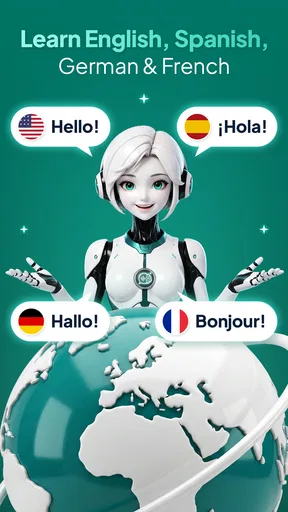
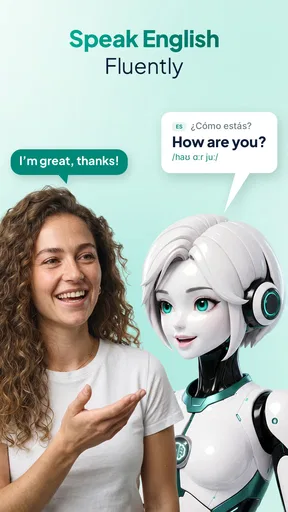
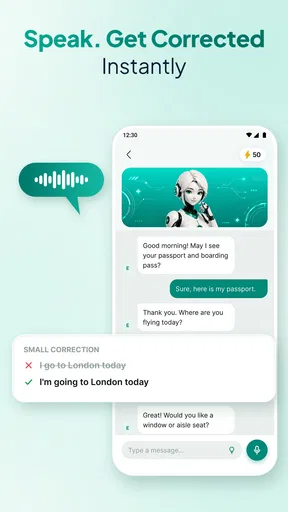
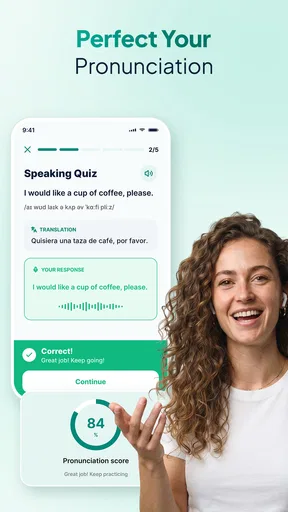

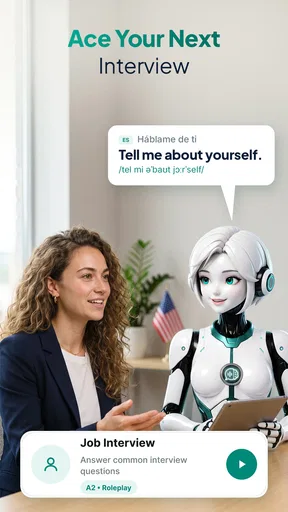
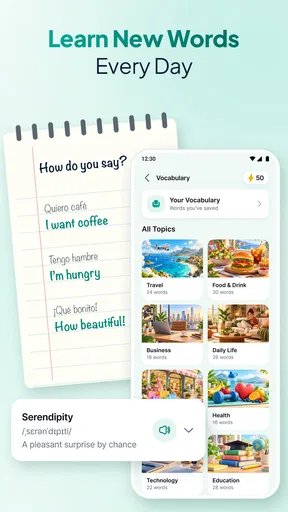
Our Review of AI Language Learning & Tutor
 Analysis by Appyee
Learning to speak English is one of those goals that sounds simple until you have to open your mouth in real time. I have used AI Language Learning & Tutor with that problem in mind: not as a replacement for a teacher, but as a low-pressure place to practise speaking and receive immediate guidance. The app sits in the Education category, comes from ATQ - AI Lab, and is free to use, which makes it easy to try without turning the first step into a financial decision.
My first impression was that its value depends less on long study sessions and more on whether you actually speak. Reading vocabulary lists can feel productive while leaving you unprepared for a conversation. This app points attention toward spoken practice, so it is most useful when you want to rehearse an answer, test a sentence aloud, or build the courage to continue after making a mistake.
The public store summary describes an English-speaking practice app with an AI tutor and instant feedback. That is a focused promise rather than an attempt to cover every part of language learning. I would approach it as a speaking companion: helpful for repetition and confidence, but not automatically a complete course in grammar, writing, listening, pronunciation, and vocabulary.
What it feels like to practise with an AI tutor
The main appeal is the reduced social pressure. Speaking with another person can make every pause feel embarrassing, especially when you are still translating in your head. With an AI tutor, I can try an answer, notice where I hesitate, and repeat the idea without worrying that I am holding up a class or disappointing a conversation partner.
That makes the app particularly suitable for learners who understand more English than they can comfortably produce. A familiar pattern is recognising a phrase in a video or message, then losing access to it when someone asks a question. Rehearsing spoken responses helps bridge that gap because the practice is active rather than purely recognitional.
I would not treat instant feedback as an unquestionable verdict on my ability. Feedback from an automated tutor can be useful as a prompt to review a sentence or try again, but language is full of accents, informal phrasing, context, and acceptable alternatives. When the app suggests a correction, I find it more productive to ask whether the revised version is clearer or more natural than to assume my original wording was always wrong.
This distinction matters for beginners. A learner who sees every correction as failure may become more nervous, while someone who treats it as a second attempt gets much more value. My preferred routine is to speak once without stopping, consider the feedback, and then repeat the same thought in a simpler form. That turns correction into practice instead of passive reading.
A realistic daily routine
Imagine that I have a short work call in English the next morning. Rather than trying to memorise a large list of business terms, I would use the app to practise a few useful situations: introducing my role, explaining a delay, asking someone to repeat a point, and summarising what happens next. I would first answer naturally, even if the grammar is imperfect. Then I would use the feedback to make the answer shorter and clearer before saying it again.
The important trick is to practise complete thoughts, not isolated words. If I only repeat “deadline,” “meeting,” or “update,” I may recognise the vocabulary without knowing how to use it under pressure. A sentence such as “I need one more day to check the figures” gives the vocabulary a job. The same method works for travel, ordering food, speaking to a doctor, or handling a simple introduction.
For a busy learner, short bursts are more realistic than promising an ambitious study plan. I would use a few minutes while preparing breakfast, before a commute, or after work. The goal is not to finish with a perfect performance. It is to make speaking feel less unusual tomorrow than it did today.
Where the app is stronger than familiar alternatives
Compared with a textbook, this tutor is better suited to the moment when I need to produce language rather than study an explanation. A textbook can explain a tense beautifully, but it cannot make me say the sentence aloud. Compared with flashcards, the app is more relevant when my difficulty is retrieving words inside a conversation instead of recognising them on a screen.
It also has a different role from a live tutor. A teacher can understand personal goals, notice recurring habits, explain a confusing point in several ways, and adjust a lesson to a learner’s mood or background. An AI tutor is more convenient for repeated attempts and private practice, but it should not be expected to provide the same human judgement. If I needed preparation for an important interview or a detailed correction of persistent pronunciation problems, I would combine this app with a qualified teacher or speaking partner.
Language-exchange services offer genuine human interaction, which is valuable but can be unpredictable. Partners may have different schedules, different correction styles, or different expectations. AI practice is easier to repeat on demand, while human conversation is better for handling interruptions, humour, unclear wording, and the small surprises that make real communication difficult. I see the app as preparation for those exchanges, not a complete substitute for them.
Who will get the most from it
I think the best match is an English learner who already knows some basic words and structures but avoids speaking. The app can also suit someone returning to English after a long break, a traveller who wants to rehearse practical sentences, or a student who wants extra practice between lessons. Its free price removes a common barrier for people who are still deciding whether speaking practice belongs in their routine.
It may be less suitable for someone searching for a full, carefully sequenced curriculum. If you need lessons that begin with the alphabet, build through a defined grammar syllabus, and track every area of progress in one place, a conventional language course may offer clearer structure. I would also look elsewhere if writing correction, human conversation, or exam-specific preparation is the main priority.
Absolute beginners should be realistic about the first experience. An AI conversation can feel demanding when even basic sentence construction is unfamiliar. I would begin with simple answers and repeatable situations rather than attempting complicated discussions. The app becomes more approachable when I use it to practise one communicative task at a time.
Trust, permissions, and the moments that deserve attention
Because this is an AI speaking app, I would pay attention to every visible request for microphone access, account creation, or personal information during setup. Speaking practice naturally involves voice input, so the microphone is central to the experience. That does not mean I should treat access casually. I would read the permission prompt, check which choice is available, and avoid sharing anything that is not needed for the exercise.
I would also separate language practice from sensitive personal conversation. There is no reason to rehearse a bank password, medical record, private workplace dispute, or identifying information. Even when a sentence is only an exercise, using invented names and general details is a sensible habit. For example, I could practise “I need to change my appointment” without including a real reference number or address.
Account controls deserve the same practical attention. If the app offers sign-in, I would check how easily I can manage that account, change access details, or remove it later. I would also look at the choices shown around notifications and any optional personalisation. A good learning tool should leave me able to decide how much of my information and attention it receives.
I am careful not to confuse an attractive interface with strong privacy. The useful question is not whether the app feels friendly; it is whether the permission prompts and account choices are understandable when I encounter them. I would pause before accepting a request that seems unrelated to speaking practice and would revisit settings if the app provides controls for doing so.
The developer is ATQ - AI Lab, and the app has reached over one hundred thousand installs. Its average rating is around 3.9, based on more than two hundred ratings, so the public response looks mixed rather than universally enthusiastic. I read that as a reason to test the app personally and judge whether its speaking workflow suits me, not as proof that it will perform identically for every learner.
Feedback is useful only when I stay in control
The phrase “instant feedback” sounds convenient, but speed is not the same as depth. A quick response can help me notice a possible issue while the sentence is still fresh. At the same time, I need the freedom to decide whether to accept the suggestion, repeat the sentence, or move on. If every correction interrupts the flow, practice can become a hunt for errors instead of communication.
My most useful workflow is a three-pass exercise. First, I speak without editing myself. Second, I review the feedback and identify one change that improves clarity. Third, I say the answer again while keeping the conversation moving. Limiting myself to one adjustment prevents a short practice session from turning into an exhausting grammar inspection.
Another useful habit is keeping a small personal list of recurring problems outside the app. If I repeatedly confuse past and present forms, or leave out a word in questions, I can note the pattern and deliberately include it in the next session. This gives the AI feedback a longer-term purpose. Without that step, instant corrections may disappear as soon as I close the screen.
I would also test the app with different speaking styles. A learner who speaks slowly and clearly may receive different feedback from someone with a strong regional accent or a habit of pausing. That does not automatically make the tool unreliable, but it does mean I should judge suggestions across several attempts rather than drawing conclusions from one awkward result.
Practical limits before making it a daily habit
The app’s narrow focus is both its strength and its limitation. Speaking practice is easy to understand, but language ability is broader than spoken replies. I would still use other resources for reading longer texts, writing messages, learning systematic grammar, and hearing a range of natural speakers. Relying on one tutor for everything could leave important gaps.
There is also a motivational trade-off. An AI tutor is available without the scheduling friction of a person, but that convenience can make sessions feel disposable. A live class creates an external commitment; an app depends more heavily on my own consistency. I would set a small, repeatable routine and measure success by whether I speak regularly, not by how many screens I complete.
Free access is a strong reason to try it, particularly for learners who do not want to pay before understanding the experience. Still, I would inspect any in-app choices carefully as I use it, especially if a feature asks for an account or presents an optional upgrade. The important thing for me is knowing which actions are necessary for practice and which are simply choices I can decline.
The age rating is Everyone, which makes the app broadly approachable in a household setting. That should not replace ordinary supervision for younger users, especially when voice input and account decisions are involved. I would help a child understand what information is safe to say aloud and check the visible controls together rather than assuming an age label answers every practical question.
Device compatibility and the first test I would run
The current version is 1.1.0 and requires Android 8.0 or later. For an Android user, that requirement is modest enough to cover many still-used phones, but I would check the operating-system version before planning a study routine. Compatibility is not only about installing the app; microphone quality, background noise, and a stable connection can also affect how comfortable speaking practice feels.
My first test would be deliberately simple. I would grant only the permission needed for a short speaking exercise, say a sentence in a quiet room, and then repeat it with a little background noise. I would compare whether the feedback remains understandable and whether the app lets me continue after an imperfect response. This small trial tells me more about practical fit than a long first session filled with complicated topics.
If I were using an iPhone, I would apply the same cautious approach to the controls shown during installation and first use. I would check the operating-system requirement displayed for that device, review microphone access, and avoid assuming that an Android requirement automatically describes the iOS experience. The principle is simple: verify the choices on the device I actually own.
My cautious verdict after weighing the trade-offs
I like the idea behind AI Language Learning & Tutor because it targets a problem many learners quietly have: they study English but do not speak enough of it. Its free entry point and private practice format make it easy to experiment with short sessions, while immediate feedback gives each attempt a clear next step. For someone who freezes during conversation, that can be more valuable than another passive vocabulary exercise.
My recommendation comes with boundaries. I would not use it as my only English resource, and I would not accept every automated correction without thinking about context. I would protect personal information, review permission and account choices, and keep control over when I speak, what I share, and which suggestions I follow.
If your main goal is to build speaking confidence through repeated, low-pressure practice, this Education app is worth trying. If you need a complete curriculum, human coaching, detailed exam preparation, or advanced writing support, another option will probably serve you better. For me, its best role is a practical rehearsal room: a place to turn knowledge I already have into sentences I can actually say.
That is a modest role, but a useful one. I would install it, test a short everyday scenario, and decide after several sessions whether the feedback helps me speak more freely. The app does not need to replace a teacher or a language partner to earn a place in my routine; it only needs to make the next spoken sentence easier to attempt.
Privacy and Permissions
See what permissions an app requests and how it handles your data.
- Microphone
- record audio
- Wi-Fi connection information
- view Wi-Fi connections
- Other
- view network connections, full network access, run at startup, control vibration, prevent device from sleeping, set an alarm, Google Play license check
Verdict
Strengths of AI Language Learning & Tutor
- Personalized lessons adapt to your current language level and learning pace.
- AI conversations provide useful speaking practice without pressure or embarrassment.
- Instant corrections help identify grammar, vocabulary, and pronunciation mistakes.
- Short activities make it easy to fit language practice into a busy daily routine.
- Progress tracking can help maintain motivation and build a consistent study habit.
Limitations of AI Language Learning & Tutor
- AI feedback may occasionally misunderstand context or suggest unnatural phrasing.
- Advanced features or unlimited practice may require a paid subscription.
- Speaking exercises depend on a clear microphone and a reasonably quiet environment.
- The app may not fully replace conversations with native speakers or human teachers.
- Some lessons can feel repetitive if you use the app for long sessions.
Other Releases by ATQ - AI Lab
View All
AI Photo Beauty Editor Studio
Photography4.2

Archo – AI Interior Design
House & Home4.1
Similar Picks in This Category
View All
Duolingo: Language Lessons
Duolingo4.7

Google Classroom
Google LLC2.8

Unacademy: Learn & Crack Exams
Unacademy3.2

Bible App for Kids
Life.Church4.4

Cake - Learn English & Korean
Cake Corp.4.7

Brainly: AI Homework Helper
Brainly4.5
Frequently Asked Questions
What is AI Language Learning & Tutor, and how does it work?
AI Language Learning & Tutor is a language-learning app that uses artificial intelligence to provide personalized lessons, practice activities, and conversational support. After selecting a target language and setting your learning goals, the app can adapt exercises to your level. It may also offer explanations, vocabulary practice, pronunciation guidance, and simulated conversations to help you study more independently.
Which languages can I learn with AI Language Learning & Tutor?
The available languages depend on the version of the app, your device, and the current content library. Most users will find popular languages such as English, Spanish, French, German, Italian, and Portuguese, although availability can change over time. Before downloading, check the app’s official store listing to confirm that your preferred language and learning level are supported.
Is AI Language Learning & Tutor suitable for complete beginners?
Yes, the app can be useful for beginners because lessons are generally organized around basic vocabulary, everyday expressions, grammar explanations, and simple conversations. The AI tutor can provide additional examples or rephrase explanations when a concept is unclear. However, the quality of feedback may vary, so beginners should still verify important grammar or pronunciation points with reliable educational resources.
Does AI Language Learning & Tutor require a subscription or offer in-app purchases?
The app may include free learning features while reserving advanced lessons, unlimited AI conversations, detailed progress tools, or additional exercises for a paid subscription or in-app purchase. Pricing, trial periods, and available plans can differ between Android and iOS. Review the payment screen carefully before confirming a purchase, especially if automatic renewal is enabled after a trial.
Can AI Language Learning & Tutor replace a teacher or help me become fluent?
AI Language Learning & Tutor is a convenient practice companion, but it should not be considered a complete replacement for a qualified teacher or real-world communication. It can help build vocabulary, improve confidence, and provide frequent speaking or writing practice. Fluency still requires consistent study, exposure to authentic content, listening practice, and conversations with proficient speakers.
